How to get started with Capital One mobile banking

Summary
- You can download the Capital One Mobile app to enroll in online banking and access your Capital One accounts from your mobile device.
- Once signed in, you can use the app to pay bills, deposit checks, monitor activity and send money.
- Eligible cardholders can also use digital payment options like digital wallets and virtual cards for online transactions and tap-to-pay purchases.
- To help keep your accounts and app access secure, the Capital One Mobile app offers several security features, such as biometric authentication, purchase notifications and fraud alerts.
Getting started with Capital One mobile banking is easy with the Capital One Mobile app. Once you’ve set it up, you can manage your accounts, send money and, if you’re an eligible cardholder, access digital banking tools like virtual cards and compatible digital wallets—all from your phone, on the go.
If you’re enrolling in Capital One mobile banking for the first time, the steps below will walk you through everything you need to know to set up and start using your account.
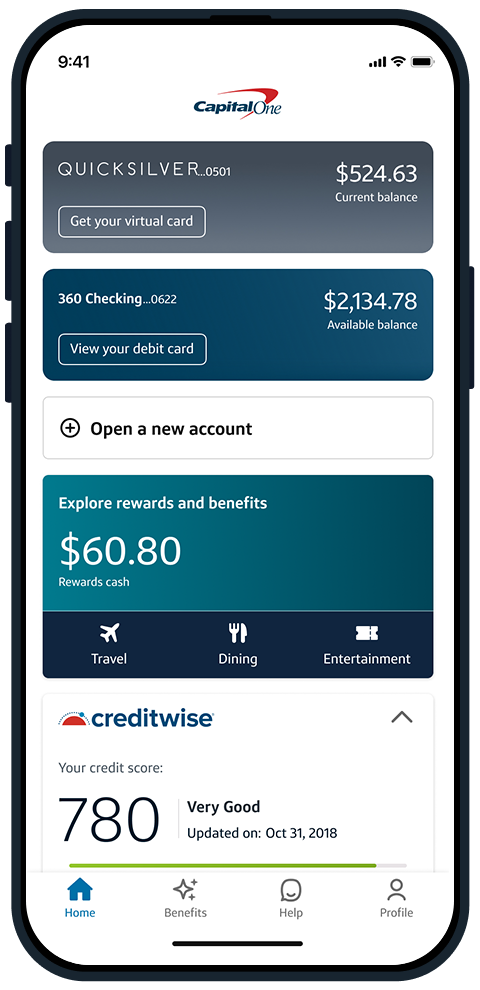
How to set up Capital One mobile banking
Follow these steps to download the Capital One Mobile app and set up your account.
1. Download the Capital One Mobile app
First, you’ll need to download the Capital One Mobile app to your mobile device. There are two easy ways to get the app:
- Download it from the Apple App Store if you have an iOS device or Google Play™ if you have an Android device.
- Text “LEARN” to 80101 to have a download link sent to you.
2. Enroll in Capital One online banking
If you need to set up online account access, you can do so from the sign-in screen on the app.
Enrolling in online banking only takes a few minutes. But you’ll want to have the following information handy to make the process as seamless as possible:
- Your Social Security number (SSN) or Individual Taxpayer Identification Number (ITIN)
- Your Capital One bank account or credit card account number
- A valid email address
3. Sign in and start using Capital One mobile banking
Once you’ve successfully downloaded the app, you can sign in using the username and password associated with your Capital One online banking account to start setting up your mobile banking experience.
What can you do with Capital One mobile banking?
Once you’re signed into the Capital One Mobile app, you can view your current account balances, monitor activity, review transactions and manage your Capital One accounts directly from your mobile device. Apple device users can also use the iOS widget to view account balances without signing in.
Eligible cardholders may also have access to additional mobile banking and digital payment tools through the app, including:
-
Digital wallets: Digital wallets allow you to securely store eligible credit and debit cards for online transactions and tap-to-pay in stores using your mobile device. Digital wallets can make checkout more convenient since you don’t need to carry or use your physical card to complete a purchase, and they can also help protect your card information using encryption and tokenization. Paze®, Apple Pay®, Google Pay™, PayPal® and Samsung Pay® are all compatible digital wallets with Capital One. Simply navigate to Profile and select Digital wallet manager, then choose your preferred digital wallet and follow the steps on screen.
-
Virtual cards: Use unique virtual card numbers linked to your credit card account to help you shop online without sharing your physical card number with merchants. Similar to digital wallets, virtual cards can offer added convenience and security since they don’t require a physical card and can help protect your card information using tokenization. Some eligible cardholders may also be able to use a virtual card at checkout with autofill on Chrome or Android apps.
-
Zelle®: Zelle® is a convenient way to send and receive money from friends, family and others you trust, even if they don’t bank with Capital One.
-
Mobile check deposit: Mobile check deposit allows you to deposit a paper check by taking a photo of it with your phone instead of needing to visit a bank branch or ATM in person.
-
CreditWise: CreditWise enables you to easily check your credit score for free with no impact while on the go.
-
ATM locator: The ATM locator helps you find a Capital One or partner ATM near you.
-
Eno virtual assistant: Eno, your Capital One virtual assistant, can help protect your credit card account by looking out for charges that might surprise you. You can also ask Eno questions about your account directly from the Capital One Mobile app.
Is the Capital One Mobile app safe?
The Capital One Mobile app has a setting for biometric authentication, which requires an extra layer of identity verification, such as a fingerprint or facial recognition, to sign in.
The app also provides access to a number of security features, including the ability to set up instant purchase notifications that may help you track spending and fraud alerts that help alert you to suspicious activity on your account. You can also enable card lock in the event your card is lost or stolen.
Learn more about how Capital One security features can help keep your information safe.
Capital One mobile banking FAQ
These are answers to some common questions you may still have about Capital One mobile banking.
What’s the difference between mobile banking and online banking?
Both mobile banking and online banking are digital forms of banking that allow you to access and manage your accounts. But mobile banking typically happens through a banking app on your phone or tablet, whereas online banking usually happens through a web browser on your desktop or laptop.
Which digital wallets work with Capital One debit and credit cards?
Paze, Google Pay, PayPal, Apple Pay and Samsung Pay are all compatible digital wallets with Capital One cards. Once you add your eligible Capital One card to your preferred digital wallet, you can use it for online transactions and tap-to-pay purchases.
Do you need online banking to use the Capital One Mobile app?
Yes. To use the Capital One Mobile app, you’ll need to enroll in Capital One online banking and sign in using your online banking username and password to access and manage your accounts.
Key takeaways: Capital One mobile banking
If you’re already enrolled in online banking with Capital One, getting started with the Capital One Mobile app is easy. The app allows you to manage your accounts on the go while accessing digital payment and mobile banking tools like digital wallets, virtual cards, mobile check deposit and account alerts.
If you’re ready to get started with mobile banking, download the Capital One Mobile app today.


